Showing posts with label Exadata. Show all posts

Friday, January 6, 2023

Exadata -My Notes

 Basic Concepts 

EXADATA Overview, Configuration and Architecture

Startup Sequence of Exadata Storage Server

Data/query Processing in EXADATA 


Practical

EXADATA Flash Disk Replacement - No downtime for databases


EXADATA Flash Disk Replacement - No downtime for databases


EXADATA Flash Disk Replacement - No downtime for databases.

Below technical steps will be followed to replace the flash disk in exadata server. This activity require a restart of the cell server but there will be no downtime for databases.


Log onto cell server as a root-  
                                                                                
#cellcli -e list griddisk attributes name,asmmodestatus,asmdeactivationoutcome
Above command must say 'Yes' for all griddisk
s

#cellcli -e alter griddisk all inactive
#cellcli -e list griddisk attributes name,asmmodestatus,asmdeactivationoutcome
Above command should say 'offline' for all grid disks


#cellcli -e list griddisk
Above command should say 'inactive'


Power off the cell server
#shutdown -h now
Above command will shutdown the cell server


REPLACE FLASH DISK - Hardware replacement
Oracle Engineer slides the cell out from the rack
Oracle engineer removes the Flash card and inserts the new one


Cell server is powered back on
At ILOM fire the below command
start /SYS
Above commd will start the cell server


Disk sync is carried out


#cellcli -e alter griddisk all active
#cellcli -e list griddisk
Above command should show 'active'


#cellcli -e list griddisk attributes name, asmmodestatus
Above command will say OFFLINE then SYNCING then ONLINE


Full resilience is restored  and there is no interruption to service during the replacement.

Data/query Processing in EXADATA


Startup Sequence of Exadata Storage Server


Startup Sequence of Exadata Storage Server:
/etc/init.d/cell.d  starts first when system starts

The exadata storage cells operate independently from each other. Cellsrv on each storage server processes I/O  requests via iDB message and independently transmits the return data/messages to the compute(DB) node. It is the responsibility of the compute server to sort, group and process the results returned from each storage server. 

The Management Server (MS) provides a java interface to the CellCLi command line interface, as well as providing an interface for Enterprise Manager(Grid Control) plugins. If MS is down you won't be able to use cellcli.

Process startup sequence  
 - The cellrssrm process is the main Restart Server(RS) process. It launches three helper processes cellrsomt, cellrsbmt and cellrsmmt.
 - The cellrsomt helper process is ultimately responsible for launching cellsrv.
 - The cellrsbmt and cellrsmmt processes are additional helper processes responsible for launching cellrsbkm and the main Management Server(MS) Java process.
 - Cellrssmt is called by cellrsbkm, and its ultimate goal is to ensure cell configuration files are valid, consistent and backed up.
 - And of course, cellsrv is the main process that performs I/O on the exadata cell.

EXADATA Overview, Configuration and Architecture


EXADATA Overview, Configuration and Architecture

What is Exadata?

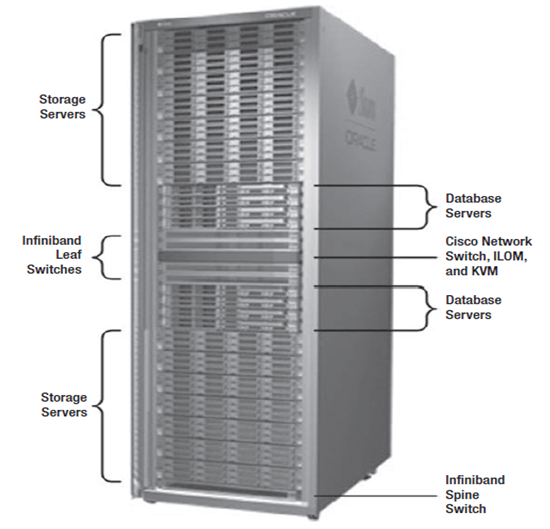
Oracle Exadata Database Machine is a combined Compute(DB server) and Storage(Cell) system optimized for running Oracle Database software. 

Exadata Servers as per its Hardware  Configuration:

 Exadata Machine:


Architecture:


LIBCELL
 LIBCELL, which is a library that is linked with the Oracle kernel. LIBCELL has the code that knows how to request data via iDB protocal.

CELLSRV
Cell Services (cellsrv) is the primary software that runs on the storage cells. It is a multi-threaded program that services I/O requests from a database server.

Management Server(MS)
MS is a Java program that provides the interface between cellsrv and the Cell Command Line Interface (cellcli) utility. MS also provides the interface between cellsrv and the Grid Control Exadata plug-in .

Restart Server(RS)
RS is actually a set of processes that is responsible for monitoring the other processes and restarting them if necessary

Input/Output Resource Manager(IORM)
 IORM manages I/O at the storage cell by organizing incoming I/O requests into queues according the database name, category, or consumer group that initiated the request. It then services these queues according to the priority defined for them in the resource plan.

Infiniband Switches 
 InfiniBand switches and cables to form a 40 Gb/second InfiniBand fabric for database server to Exadata Storage Server communication, and RAC internode communication.
 
 
Cellinit.ora and Cellip.ora
After Oracle Exadata Storage Server is configured, the database server host must be configured with the cellinit.ora and the cellip.ora files to use the cell. 

The files are located in the /etc/oracle/cell/network-config directory of the database server host.These configuration files contain IP addresses, not host names.

cellinit.ora - This file contains the database IP addresses.
cellip.ora -    This file contains the storage cell IP addresses.

Example:

Quarter RAC Exadata machine contains 2 compute(DB) nodes  and 3 Cell(Storage) servers.Below picture shows the ip configurations. 

192.168.50.23 and 192.168.50.24 belongs to Compute Nodes.
192.168.51.27, 192.168.51.28 and 192.168.51.29 belongs to Cell Servers.